
DreamDoc Garmin Connect IQ Guide
HRV+
HRVplus
A resting HRV test for Garmin watches. The key is not only starting the test — the key is doing it under clean, repeatable conditions so the result can be interpreted.
What this app really does
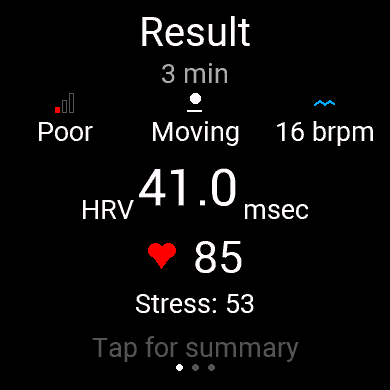
HRV+ records a timed resting session from the Garmin optical sensor. During the test it collects heart beat interval data and builds HRV windows, together with heart rate, stress, respiration, steps and body battery where available.
Quick HRV
3-minute resting check. Good for a fast morning or pre/post intervention measurement.
Standard HRV
5-minute recording. Better when you want a more stable result and can sit still.
vs Best
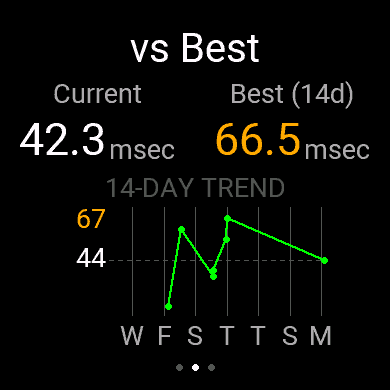
The result view can compare the current session with your recent 14-day best/history.
How to perform a valid HRV test
-
1
Choose a repeatable moment. Best: same time of day, ideally morning, before caffeine/training/work stress. Comparing random moments makes the result harder to interpret.
-
2
Wear the watch correctly. It should be snug, clean, and above the wrist bone. A loose watch creates bad optical signal and unstable beat-to-beat intervals.
-
3
Pick duration. Use Quick HRV (3 min) when time is short. Use Standard HRV (5 min) for a better comparable baseline. Longer tests only help if you remain still.
-
4
Confirm the rest screen. The app explicitly warns: accurate HRV requires total rest, no steps, no activity. Start only when you are ready to stay still.
-
5
Do not move during recording. Do not walk, talk, change posture, scroll your phone, or tighten the strap mid-test. If steps are detected, the fixed-duration HRV test is stopped and marked invalid/discarded.
-
6
Wait for the result. The AMOLED screen may dim; that does not mean recording stopped. At the end, review Avg HRV, stress, Body Battery and the vs Best / 14-day trend panel.
What is special and what to take care of
Why stillness matters
- HRV is calculated from beat-to-beat timing. Movement can corrupt those intervals.
- Stress and respiration are also sampled; moving mixes physiology with activity artefacts.
- A low HRV after walking is not the same as a low HRV after true rest.
- Repeatable conditions make trends meaningful.
Common mistakes
- Starting immediately after stairs, workout, shower or caffeine.
- Testing while standing or walking.
- Comparing a 3-minute morning test with a 5-minute evening test.
- Reading one result as a diagnosis. HRV is context, not a medical verdict.
Why connecting DreamDoc is the benefit
The watch gives you the immediate session result. DreamDoc adds better reporting: the full session is uploaded, stored, analysed and compared with recent sessions and Garmin context.
DreamDoc can report RMSSD/HRV, start-to-end HRV change, mean heart rate, stress and a session graph. When available, it adds overnight sleep, overnight stress/HRV and preceding-day activity as context. That makes the result easier to understand than a single watch number. Pair it with overnight Know Your Day and the science of physiological dynamics.