
DreamDoc Email Guide
HRV+ Email
Session Report Explained
This page explains the HRV+ email after a resting HRV session: what the state means, what the KPI cards show, and how DreamDoc adds context.
When this email is sent
The HRV+ email is sent after a valid HRV or HRVplus session uploads to DreamDoc and email is enabled for the HRVplus app. If Garmin context is still arriving, DreamDoc can wait briefly and then send with the context that is available.
Email sections and meaning
| Email section | What it shows | How to read it |
|---|---|---|
| Hero state | Settled, Mixed, Activated or Stable. | The short practical interpretation of the HRV session. |
| Session RMSSD / HRV | The main HRV value from the recording. | Higher can indicate more parasympathetic settling; lower can indicate activation or strain. |
| Start to end change | Whether HRV rose or fell during the session. | Rising HRV with lower stress often suggests the body settled during the recording. |
| Mean heart rate | Average heart rate during the resting session. | Useful with HRV and stress. High HR with low HRV can indicate activation. |
| Mean stress | Garmin stress during the session. | Lower stress supports a settled interpretation; high stress can explain a mixed/activated result. |
| Session graph | HRV trend over the session, sometimes with stress. | Shows whether the session stabilized, improved or became more activated. |
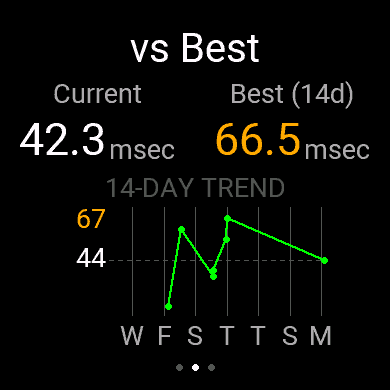
| vs recent sessions | Comparison with recent HRV+ history, often 14 days. | Helps avoid over-reading one isolated session. |
| Garmin context | Sleep, overnight stress/HRV and prior-day activity if available. | Explains why today’s HRV session may look better or worse. |
What the hero state means
Settled / Stable
- Settled: HRV improved and/or stress reduced clearly during the session.
- Stable: no strong positive or negative movement. Often normal.
- Use these as green-light context, not as medical clearance.
Mixed / Activated
- Mixed: signals moved but do not tell one clear story.
- Activated: HRV fell while stress rose, suggesting the body did not settle.
- Repeat under clean resting conditions if the result is unexpected.
Why DreamDoc reporting is better than the watch alone
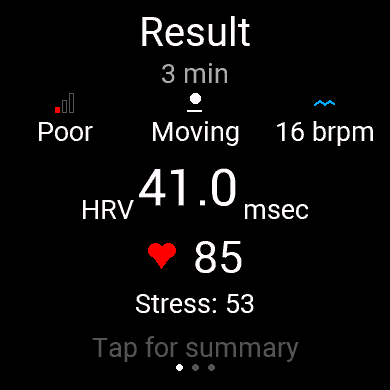
The watch shows the immediate HRV session. DreamDoc stores the session, compares it with recent HRV history, adds Garmin sleep/activity context, and turns it into a readable report.
How to use the email
- 1Check test quality first. If the watch showed poor signal or moving, repeat seated and still.
- 2Read HRV together with stress and heart rate. One number alone is weaker than the combined pattern.
- 3Compare to recent sessions. Use the 14-day context instead of reacting to one isolated measurement.
- 4Use context practically. Poor sleep, high stress or heavy prior activity can explain an activated session.