
DreamDoc Email Guide
ReactionTime Email
PVT-B Result Explained
This page explains the result email after a Brain Speed & Reaction Time test: what the score means, why false starts matter, and why sleep context may appear.
When this email is sent
The email is created after a completed ReactionTime / PVT-B test uploads to DreamDoc. Invalid or unusable tests are not emailed, because DreamDoc should not send a warning based on bad test data.
Email sections and meaning
| Email section | What it means | How to read it |
|---|---|---|
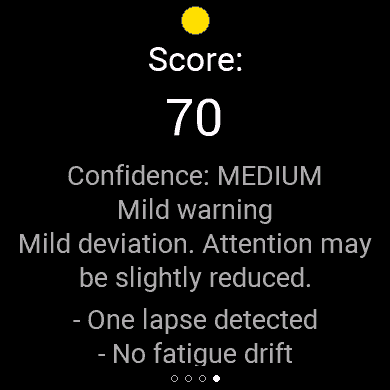
| State / headline | The practical verdict, for example normal, mild warning or reduced alertness. | Read this first. It summarizes the full test. |
| Score | A 0-100 summary based on the test domains. | Useful for quick comparison, but the label/state is more important than the number alone. |
| Confidence | How trustworthy the interpretation is for this test. | Medium/low confidence means interpret carefully and repeat under clean conditions if needed. |
| Reaction speed | How fast you tapped after the green signal. | Fast is good only if you waited for green and did not guess. |
| Consistency | Whether your responses stayed close together or spread out. | Stable timing means sustained attention. A wide spread means attention fluctuated. |
| Lapses | Very slow or missed responses, usually around the timeout window. | Several lapses are a strong warning for reduced vigilance. |
| False starts | Taps before green or implausibly early responses. | They count as bad because they show anticipation instead of real reaction. |
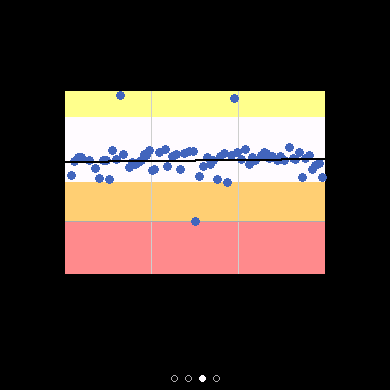
| Distribution | The pattern of all trials, not just the average. | A tight distribution is better than a result with the same average but many outliers. |
Why the email may mention bad sleep
DreamDoc first evaluates the ReactionTime test itself. Then it looks at Garmin context: sleep, stress, HRV, wake time, recent sleep debt and recovery. Context explains what may be relevant today, but it does not change the test score.
Sleep/recovery context may appear when
- Last night was shorter than your usual range.
- Sleep debt built up across the last 3 or 7 nights.
- Overnight stress or sleeping heart rate was elevated.
- Overnight HRV was lower than usual.
- The test was close enough to wake time for a meaningful timeline.
What it means for attention
- Slow speed can mean reduced processing speed.
- Poor consistency can mean attention is unstable.
- Lapses can mean vigilance dropped during the test.
- False starts can mean impulsive/anticipatory response control.
- Repeated reduced results matter more than one single test.
How to use the email
- 1Check the state first. Do not over-focus on one number. The state combines speed, consistency, lapses and control.
- 2Look for the reason. If DreamDoc mentions sleep or recovery, use it as context for why alertness may be reduced today.
- 3Repeat when needed. If the result is surprising, repeat later under clean conditions: seated, focused, no distractions, tap only on green.
- 4Watch the trend. One bad test can happen. Several bad tests with poor sleep or stress context are more meaningful.